Thursday, March 24, 2011

Making the Most of Your Internet Play Time

Jade over at Super Organiser Mum has a great post today. She recently took a week off of the internet. She unplugged, and just enjoyed life without the world wide web. Today's post reflects on what she learned in that time. Now that she is using the internet again, she has decided to limit the time that she is online.

I'm going to share with y'all a list of 5 things she did to make the most of her online time. The first few have to do with e-mail, so here is a picture of the inbox I am starting with. Also, I did these in my own order as you'll see...


{Is that really 111 items in my inbox and 951 unread items!?!?}

#1 Completely empty everything (inbox, sent, etc) and reorganize
 I started to delete things, but I soon realized that the first thing I needed to do was to
 #2 unsubscribe to all of the crap I had coming in

These are all things that I unsubscribed from. I don't really know where these came from, and they aren't things I ever read. So why do I still get them?
Oprah
NoMoreRack
Omaha
1saleaday
read it forward

Ok Gone!

I went through my inbox and deleted everything that wasn't necesasry.  There was a lot of crap to take care of before I could just hit delete. All of the links I had sent myself of future projects to try went into a notepad. Each recipe got it's own notepad to be printed later. I also had an Amazon Subscribe & Save I needed to un-subscribe to.

I created some folders which you can see marked in red in the picture below. I have it set up to show the inbox all the time. Any other category is shown only if there is something unread in it. I also used filters to move anything I subscribe to (newsletters, spark people, fly lady, etc) directly to the label and to skip the inbox. That way I know if there's anything new, but it's not right in my face distracting me. I can click on the
label when I have time to go through all the new messages.

You'll notice I haven't deleted EVERYTHING. I'm unable to save the videos to my computer (weird I know) at work. So I marked with a star everything I need to save to my home computer and plan to do that this evening. The other e-mails in there are things I am not finished working on. After the pictures you can
see that I'm planning a bachelorette party, I have my memory verse saved in there (so that I can easily
access it from home, work, the phone, etc.), and that I have a virtual pre-paid gift card to redeem...
don't get excited! There's only $1.27 left on it! *lol* There is also a reminder from a facebook group I
am in.

The majority of those will go away tonight when I can save the videos. The giftcard expires at the end of
the month, so if I can't think of anything I can buy online for $1.27 I will delete that when it expires (suggestions?).
The memory verse I'm still thinking about. It's convenient, but I don't know if I want it taking up the
space in my inbox. I think I'll see what it looks like once everything else is out, and then decide if I
will keep it there or not. The bachelorette party conversation will stay until August. But that's the only
one that will be there for any length of time.

#3 prioritize your internet time

I don't think this is a huge deal for me, but then again I don't think it would hurt. I am on the internet
for the following things:
couponing - mostly on Sundays
reading blogs - on lunch at work
writing my blogs - on lunch at work
playing Minecraft - occasionally in the evening with my hubby
facebooking - mostly on my phone
email - mostly on my phone
bill pay/budgeting - I try to do this every payday

The only things I think may be an issue is the facebook. My phone is addicting. I think I need to do as
Jade suggested and ask myself "is there anything else that needs to be done?" before I pick up my phone.
If the answer is yes, no facebook.

#4 pare down blog reading list

I just got in to blogging, so I don't know if I'm ready to do this. I have about 20 blogs I currently
read. Most of the time, I read these during the day at lunch at work. This doesn't really cut in to any
family/productive time.

#5 delete facebook friends

I've already been doing this some. I used to have over 1,000 friends (yes seriously), and now I have
gotten it down to 483. Woo hoo!

And here is the pretty after picture!


Ok, so I've gotten everything cleaned up as much as I can from here. I plan on clearing out the rest of
the pictures/movies this evening, and I'll just be left with important things that actually need to be
done! Yay!

Is your inbox/internet life in need of a little organizing?

Weekend To Do+

Alright ladies, it's time to get those weekend to-do lists ready. As a working mom, I rely on my weekends to get caught up on what I just don't have time to do during the week. This includes cleaning, cooking, errands, etc. There are certain things I do every weekend, or every other weekend which helps keep me on track. The repeated things are going to the bank, filing, paying bills, and the basic cleaning. I also try to grocery shop on the same day every week (Friday, except for couponing which is done Sunday-Tuesday). So with that, let's get started!

ToDo:
Go see mom
bank
bill pay
filing
vacuum
dust
sweep
mop
run Friday evening
run Saturday morning
run Sunday morning (1 mile?)
church - 10am Sunday
lunch after church - after church Sunday
Gallery Night - 2pm-9pm Saturday
grocery shopping
meal plan
FIL may be coming over to replace door to garage & bring more baseboards - Saturday

Last week's list:
clean out the fridge
dress shopping for the wedding I'm in in September (more of a need than a want)paint master bathroom trim
deep clean guest bathroom (so little man can go in there)
family filing (I'm so far behind!)cook a good meal
swing by Michael's and finally use my gift card
cook that ground beef that's going to go bad if I don't cook it soon! gah!
organize the office (yea right!)


I took off any thing that I have to do every weekend (aka typical cleaning) completely. So I can add to the list:

clean out the fridge
paint master bathroom trim
deep clean guest bathroom (so little man can go in there)

Time to Prioritize!

Time Sensative:
#1 bank
#2 bill pay
#3 running
#4 gallery night
#5 grocery shopping (we lived off of $25 for the last two weeks so we need food!!!)
#6 church & lunch after
#7 F-I-L coming over (maybe?)
#8 meal plan

Ick Factor + Baby Safety:
#9 vacuum/dust/sweep/mop
#10 deep clean guest bathroom (so little man can go in there)

Ick Factor:
#11 clean out the fridge

Other:
#12 go see mom... although this is really priority #1

My husband is calling his dad to find out if he's coming over Saturday to work on the house.  So that will make a big difference to my to-do list... hmm... waiting is hard...

Anyway, let's move on for now.

Things I can do tonight:
#8 meal plan
#10 deep clean bathroom
#12 go see mom

What I'm left with:
#1 bank
#2 bill pay
#3 running
#4 gallery night
#5 grocery shopping (we lived off of $25 for the last two weeks so we need food!!!)
#6 church & lunch after
#7 F-I-L coming over (maybe?)
#9 vacuum/dust/sweep/mop
#11 clean out the fridge

Ok so finally, the entire point of this post:

To-Do Thursday:
visit mom
meal plan
deep clean bathroom

To-Do Friday:
bank
bill pay/filing
grocery shopping
vaccum/dust/sweep/mop
run with Sharese in the evening

To-Do Saturday:
run first thing (before it gets too hot)
possible F-I-L visit/work in the morning*
gallery night from 2pm-9pm
*if F-I-L doesn't come over I will clean the fridge

To-Do Sunday:
run 1 mile
church
lunch after church
couponing
visit mom

Phew! That's a lot! We'll see how it goes... stay tuned for an update Monday!

Wednesday, March 23, 2011

Oops!

I made a boo-boo!

See, I started this blog for my own rambling thoughts. Then I started reaching out to other bloggers. To be honest, I wondered why nobody wrote me back. I wasn't really concerned though. This blog is first for me. Then I saw a little button called comments on my screen. What's this? I clicked it and... woah! People have been commenting.

Apparently, I never set up blogger to e-mail me when I got a message. Oops! The worst part is I missed out on meeting up with a really inspirational blogger while she was in town!

But now I know, so if I never wrote you back, I'm sorry. I promise I wasn't being rude... just being a newbie! And Susan, I'm so sorry I missed you while you were in town!!!!!

Meal Planning (aka. the dirty dirty devil)

Why I don't do it:

I HATE IT! I HATE IT! I HATE IT!

Ok, no really, I don't. I just think I do. I have no good reason not to meal plan. I see the success of so many people. I'm a rational person, and I can see that starting to meal plan now will help so much when my little one is not so little anymore. I also see the merit in helping my  husband. He gets off work 2 hours before me. He feeds the little man before I get home. I know that having a plan in place (or even pre-cooked) would help him imensly! OO! What if I cook when I get home, and make enough for 3 people (even though the smallest one is in bed). Then the leftovers for that will be his dinner with Daddy the next day! Perfect! So why don't I meal plan? I don't know...

Today I'm reading over on Ask Anna Moseley. When I say I'm reading somewhere, let me explain what that means. It means that someone, somewhere linked to her. Within her blog she linked to other posts she had done. At the bottome of those blog posts were links with pretty pictures that piqued my interest. I can spend hours on a new blog just link-hopping!

The page I ended on is about meal planning. *sigh* Why does everyone do this? One thing that has separated this post from the 9 bajillion other posts I have read on meal planning, is that she seems to think like me. She's got a list (L-O-V-E) with paragraphs explaining each thing (L-O-V-E)! Oh! And she doesn't plan meals for specific days! Ok, maybe that's the true reason I'm singing her praises. One of my anti-meal-plan go-tos is that I don't know today (Wednesday) what I want to have next Thursday. Sure, I'll be home. But how do I know I'll want mexican vs italian? or what about Chinese? Or maybe I just want a good ol' fashioned meat loaf!

Anyway, Anna breaks things down into 8 easy steps!

1) Get your recipes accessible. This is a hard one for me. I have TONS of cook books... but I don't actually cook out of them. I also have tons of meals I've made just playing around... but I don't remember how I made them. Then I have family/friend recipes... but I can't find them. Oh! And I have an entire drawer in my kitchen dedicated to all of this crap!

I've never given this a lot of thought, but it makes absolutely zero sense! Why do I have an unorganized junk drawer of recipes I never use, when I could have a much simpler, usable system. So here's my thoughts. I want to make recipe rings.  You know, the little open/close rings from the office supply store? Well I want to put my recipes on index cards and punch them. Then keep them on the ring. That will free up SOOOOOOO much space in my drawer! Ack!

I think I'll do one for cooking and one for baking. If you know me at all, you know I bake A LOT. And I'd like to keep those separate.

Also, if I keep with this meal planning thing, I can remove the recipe cards for the meals I'm planning, then just put them back when I'm done with them. If I don't meal plan, it'll still be convenient to have them there!

2) Get a meal calendar. Ok, as I said above, this is usually where you'll lose me. I don't know what I want to eat next week. I don't know what I want to eat tomorrow. In fact, if I have a snack this evening, I don't know what I'm going to want for that either! So how am I supposed to use a calendar? I know I know! But stay with me please... we'll get there!

3) Use a shopping list. Check! well sorta... See, I used to be GREAT about using a shopping list... but then I started couponing. Then I stopped using a shopping list and started using the couponing list. The problem is that, sometimes I need something that's not 50% or more off! In which case, I don't have it written down.

This shouldn't be hard for me though. I think the answer is to go back to having 2 shopping lists. The first one being my meal-plan/keep stocked at all times list. The second being my couponing list. If I keep a running list of everything I WANT in my house, it's easy to just cross off what I don't have to buy that particular day. Then I can add bonus things I need for specific recipes as well.

4) Count out the meals you need for that pay period. This is pretty easy for me. My dear husband and I work at the same place so we get paid on the same day. Every other Friday is payday in our house! Woo hoo!

{Skip this if you want... I don't mind... This is my family's particulars}

So there are always 14 days of meals. It breaks down to (for each pay period) 14 dinners (for 3), 18 breakfasts (for 1) at work, 2 breakfasts (for 1) at home, 4 breakfasts (for 3) at home, 18 lunches (for 1) at work, 2 lunches (for 1) at home, and 2 lunches (for 3) at home. If you're doing the math, you'll know I'm missing 2 lunches... those are SUnday at we go out to eat with the in-laws. 

{ok come back now!}

5) Go through the recipes and pull the number you need.

6) Make your shopping list.

7) Write the recipes on the calender. WHAT?! WAIT! BUT YOU SAID... I know I know! But here I'm going to quote directly from Ms. Anna herself.

"Here's my rule: write each recipe on any day you'd like, you are not restricted to making that recipe on that day.  If you want to be strict about it you are welcome to do that but I know for me sometimes I feel like making a certain thing and other times I don't.  The calendar is important because it's a visual tool of what you know you have on hand and what your options for dinner are but, for me, that's about it."

See! I told you I love her!

8) Keep it all together.  Basically, once you've gotten all organized, don't keep it all over the house. Keep it close together where you can easily access it all.


So there you go. I think I'm going to give this a try. It just so happens to be pay day this Friday, which gives me 2 days to get it all together... think I can do it? I'll definitely let you know how it goes!

Verse of the Week


This weeks verse is a favorite of mine. I like the not-so-subtle reminder it gives. We are not saved becasue of something WE have done. Salvation is a GIFT. 

Want to join me? Click the link below and check out Lindsay's site!

Tuesday, March 22, 2011

Weekend To Do: Reviewed

Ok, sorry for the late review, but yesterday was a very hectic day. Prayers would be appreciated for my mother who is in the hospital right now.

Here is what I intended to do:

To-Do Thursday:
Cook the ground beef and freeze
Clean fridge while that's cooking


To-Do Friday:
vacuumsweep floors
dress shopping


To-Do Saturday:
Quick dustmeal plan for next week

Thursday -
My dear husband cooked the ground beef for me! How nice was that?! This gave me the opportunity to clean the fridge (not done, but I got the door and all of those shelves cleaned up) and dust.

Friday -
A pretty crazy day. When I got home from work I was on the phone with the insurance people until it was time to go dress shopping... nothing accomplished! Ugh!

I did manage to vacuum when I got home though, and sweep up at least under the high chair where it was most needed.

Saturday -
Dusting was done, but I did not meal plan for the week. I really don't remember much of what I did, but I know we were busy!


So in general, not too shabby! I got everything done except for my meal plan. And since this is the first week I was going to try a meal plan, I don't think it's a huge loss that it wasn't done!

Saturday, March 19, 2011

DIY - Ballard Designs Inspiration


Morning loves! I have been wanting to do a DIY tutorial for a long time... in fact, I've been wanting to DIY for a long time... but I confess I've been scared. I'm a perfectionist, you see. So I want things to be perfect. I also tend to be a bit hard on my self so the conversation goes something like this.

Me #1: Ooo! I can be crafty! I can make something for my home!
Me #2: No you can't! It won't be good enough!
Me #1: Yea, you're right...

And that's the end of it. But yesterday afternoon I told Me #2 to take a hike! I was killing some time at Michael's and I decided to finally make the Ballard Designs inspired artwork that was one of the very first blog posts I ever read.

 {Ballard Designs}

 
I didn't have the blog on me, and didn't think of looking it up on my phone, so I just winged it (is that right? winged? wang? idk...). So I needed pretty paper, glue of some sort, and something square. Canvases were on sale so I got a set of 4. I got some Mod Podge and a brush too. I came home and told my husband all about the plan I was going to do "eventually." He kinda gave me a funny look when I said I didn't know what to do. See, he was reading Harry Potter... and I just finished the last one... so what am I supposed to do with my time? Those of you who are quick are thinking "yea but, you bought crafty stuff, you could... idk... craft?" but I had already forgotten about that! So anyway, with some helpful reminders from my husband I decided to go on my way. What started out as a covered canvas project became much different and actually much cheaper, as you'll see below. This taught me a great lesson though, don't avoid doing projects you see on other people's blogs because it looks like something you can't do. You may be right, but you'll find a way to make it your own and will be all the happier for it!

So here are all my pretty little supplies:

 4 pretty blank canvases (6x6)

4 pretty scrapbook papers (I got the thick cardstock-like ones... I got them because they were prettier than the regular papers, but this will be important later.)
  
Mod Podge and a foam brush


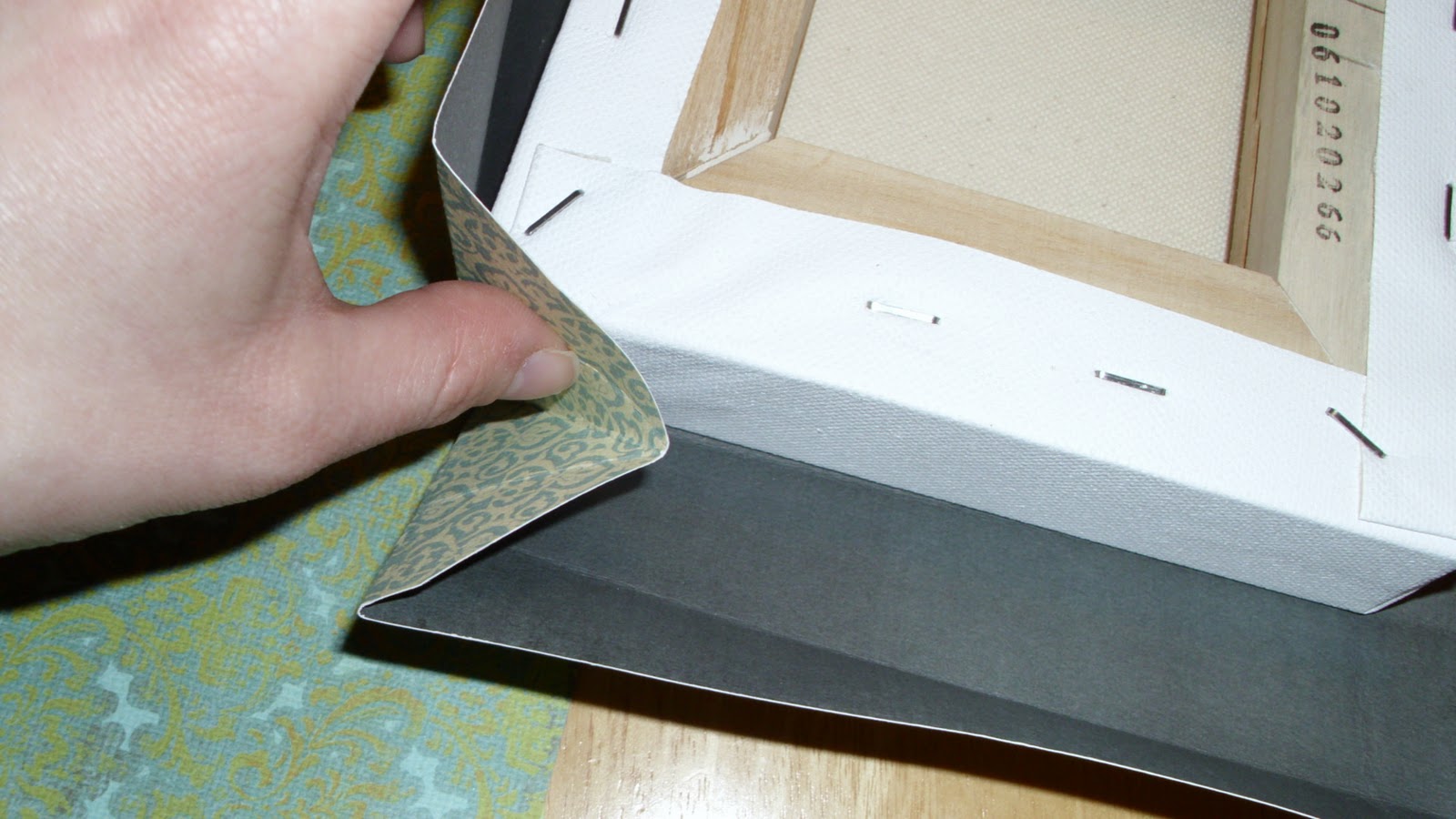
The first thing I did is begin to wrap my canvas like a present.


In order to make the corners smooth, I folded them out to get a 45% angle fold.


Then I laid it flat and cut off the top (to avoid a build up of excess paper making the corner bulky and harder to deal with)

With all of the folds already in place, I wrapped the present right up. It's important to get all of the folds in place before you wrap so that you can get crisp clean lines.


The finished corner should look like this.


At this point (I don't have a picture), but it's looking like a big box without a top on it. I still needed to fold down the paper that's sticking straight up the back. When I did this it was very bulky again, so I made a few more cuts like so:


More wrapping.


And the final back looked like this.


At this point, I realized that the paper was really holding up well on it's own. I started to question whether I needed the canvases at all. After consulting with the boss man (my dear husband), we decided they were sturdy enough to live without canvases underneath. SCORE ONE FOR KRISTI! I now have 4 blank canvases for ANOTHER project! Woo hoo!

I unwrapped the canvas, pulled it out, and modgepodged my box together. We decided to go for a matte look, and since I had purchased semi-gloss modge podge I was very careful not to get any on the front or sides. If you purchased different modge podge or wanted a shinier look, you could always cover the whole thing, which would really save a lot of worrying about getting glue everywhere!

So here's the final project!


A beautiful wrapped canvas. And here's a shot of my secret...


All empty!


And here's the beauty on the wall! Yes, I know it's a little empty, but little man went to take a nap and we can't do any more hammering/hanging until he wakes up.


Final cost for this project $2.

The canvases were $12.99 (40% off... and I didn't use them anyway).
The Mod Podge was $3.89 (I don't count this because I barely used it at all).
The sponge brush was $0.39 (Also not counted since it will be reused).
The scrapbook paper was $2.00 (on sale 2/$1).

And it took about an hour!

Lessons I learned in my first DIY project...

1) Don't be afraid... just try it!
2) You could make the boxes SOOO much easier if you had a silhouette machine! Oh wait! I do... except I'm too scared to try it (see lesson #1)!


And finally a HUGE THANK YOU to Sarah at Thrifty Decor Chick for the inspiration and for really getting me in to DIY design in the first place!


I linked up!